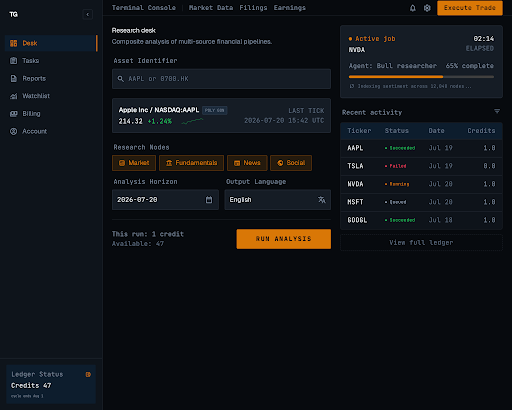
TradingAgents Report research desk showing a multi-agent stock analysis workflow

12research roles

TradingAgents Report

TradingAgents Report is a multi-agent research desk that turns one listing into evidence, debate, risk review, and a five-tier final rating. Research only. No trade execution.

New accounts receive free analysis credits

12
research roles

Evidence modules, Bull/Bear debate, planning, risk review, and the Portfolio Manager form a traceable research path.

5-tier
final rating scale

The Portfolio Manager issues the product conclusion: Buy, Overweight, Hold, Underweight, or Sell.

Multi-market
enabled exchanges

US, Hong Kong, China A-shares, Japan, and Taiwan, subject to the deployment whitelist.

Simulated Trading
10,000 USD starting cash

Practice with virtual cash and delayed quotes. No broker connection or live orders.

Research MCP

Call the research MCP from your editor

Cursor, VS Code, Claude Code, Codex, and Gemini can start analyses, read the watchlist, and place simulated orders. Add a URL, then sign in. Do not put tokens in the config file.

27 tools
jobs, market, watchlist, credits, paper
Streamable HTTP
hosted MCP endpoint
Desk OAuth
PKCE, no config token

One click or one command

  • Cursor
  • VS Code
  • Claude
  • Codex
  • Gemini
  • Windsurf

Install without editing JSON

OAuth
claude mcp add --transport http tradingagents-report \
  https://mcp.tradingagentsreport.com/mcp

codex mcp add tradingagents-report --url \
  https://mcp.tradingagentsreport.com/mcp
codex mcp login tradingagents-report

gemini mcp add --transport http tradingagents-report \
  https://mcp.tradingagentsreport.com/mcp

How research forms

Evidence, debate, then a final rating

Optional specialist modules gather evidence. Bull and Bear debate, a Research Manager plan, Trader proposal, and risk review always follow. The Portfolio Manager issues the final five-tier rating.

Read the full research method
  1. Specialist evidence

    01

    Choose Market, Sentiment, News, and Fundamentals modules. Selected analysts run in a fixed order from the confirmed listing and analysis date.

  2. Debate and research plan

    02

    Bull and Bear researchers challenge the evidence. The Research Manager drafts an investment plan; the Trader proposes Buy, Hold, or Sell as an intermediate step, not the final product rating.

  3. Risk review and final rating

    03

    Aggressive, Conservative, and Neutral risk voices stress-test the plan. The Portfolio Manager decides Buy, Overweight, Hold, Underweight, or Sell.

    • Market
    • Sentiment
    • News
    • Fundamentals
    • Bull / Bear
    • Research Manager
    • Trader
    • Risk review
    • Portfolio Manager

What you receive

Decision brief and role reports

Read the Portfolio Manager decision first, then the Markdown from roles that ran.

  • Five-tier final rating

    The Portfolio Manager issues Buy, Overweight, Hold, Underweight, or Sell.

  • Structured decision card

    Conviction, reference price, position, zones, target, and key risks.

  • Analyst signal lanes

    Market, sentiment, news, and fundamentals signals appear only when their modules ran.

  • Full role Markdown

    Full specialist, debate, risk, and manager reports, exportable from the product app.

Browse published reports

Simulated Trading

Test the thesis in Simulated Trading, not a live account

A five-tier rating is still a hypothesis. Simulated Trading records what you would buy or sell with 10,000 USD virtual cash, delayed quotes, and a server-side ledger. It is not a brokerage account.

10,000 USD
opening simulated cash
Market + limit
buy and sell orders
T+0 / T+1
per market rule
How Simulated Trading works
  1. Server-side simulated ledger

    01

    Equity, cash, positions, and P&L persist on the server. Opening grant is 10,000 USD simulated cash. The browser is never the account of record.

  2. Market and limit orders

    02

    Place a simulated buy or sell from a stock page. Market orders need an open session; limit orders can wait for the next tradable session.

  3. Fees in usage points

    03

    Simulated cash is not used to pay fees. Fees settle in credits from notional, first from plan points then bonus points.

  4. Research, then inspect the fill

    04

    Attach a short note to the order. Review fills, T+1 sellability, and unrealized versus realized P&L in Simulated Trading.

Markets and data

Coverage stated with its limits

Research runs only on admin-enabled exchanges after listing identity is resolved. Every report records an analysis date; quotes can be delayed.

NASDAQUS tech & growth
NYSEUS blue chips
AMEXUS ETFs & small caps
OTCUS OTC market
HKEXHong Kong listings
SSEShanghai A-shares
SZSEShenzhen A-shares
TSEJapan listings
TWSETaiwan main board
TPEXTaiwan OTC market
  • Enabled exchange set

    Default seeds include US (NASDAQ, NYSE, AMEX, OTC), HKEX, China A-shares (SSE, SZSE), Japan (TSE), and Taiwan (TWSE, TPEX). Live availability follows the deployment whitelist.

  • Listing identity first

    Ticker, exchange, and asset identity are resolved before research. Provider-specific symbols are not the public instrument identity.

  • Time-bounded evidence

    Prices, fundamentals, and news stay inside the selected analysis date. Missing source fields are not invented; social or prediction inputs may reflect live-at-run data.

See markets and data boundaries

Research desk

Run the pipeline in the product app

Sign in to search a listing, set the analysis date, choose evidence modules and models, then track the job through to a report.

01

Listing-aware input

Search by symbol, confirm the exchange, and keep ticker identity separate from vendor-only codes.

02

Configurable evidence modules

Market, fundamentals, news, and sentiment are optional. Debate, risk review, and the Portfolio Manager always run.

03

Batch up to five symbols

Submit up to five instruments at once. Each creates its own analysis job and credit check.

04

Quick and deep models

Pick quick-think and deep-think models from the admin-open catalog. Both stay on the same provider for one job.

05

Usage-point billing

Plan points and bonus points are tracked separately. Successful or user-cancelled runs settle from actual AI cost; system failures are not charged.

New accounts receive free analysis credits

Start free research

Apache 2.0 on GitHub

Self-host the research engine

The multi-agent graph—evidence, debate, risk review, and a five-tier rating—is public. Clone it, bring your own keys, run the CLI. The hosted desk is the product around that engine: accounts, credits, and published reports.

  • TradingView-first data

    Exchange-level symbols, bars, indicators, news, and fundamentals. Yahoo Finance remains a fallback.

  • Structured decisions

    Analyst signals, a decision brief, and in-window chart snapshots—not only Markdown.

  • Multi-market tickers

    Deterministic parsing for NASDAQ:AAPL, 600519.SS, and HKEX:700.

  • In-process cache

    TTL cache by default. Optional Redis if several processes share a ticker.

Clone and install

Apache 2.0
git clone https://github.com/tradingagents-report/tradingagents-report.git
cd tradingagents-report
python3.12 -m venv .venv
source .venv/bin/activate
pip install .

Python 3.12. Redis and PostgreSQL are not required for a local run.

Public engine

CLI and Python entry point. You supply LLM and market-data credentials. Runs stay on your machine.

Hosted desk

Sign-in, usage-point billing, private jobs, Simulated Trading, MCP, and curated public reports. Not in the clone.

Apache 2.0 derivative of Tauric Research / TradingAgents (arXiv:2412.20138).Read the paper explainer

Usage capacity

Usage points for research capacity

Monthly plans grant cycle usage points for the research desk. New accounts can also start with signup bonus points. Live prices and entitlements are confirmed in the product billing page.

Starter 20

Entry cycle capacity for individual research workflows.

$20/ month

2,000 usage points / cycle

  • 2,000 plan points each billing cycle
  • Research desk on enabled exchanges
  • Cost-based settlement per finished job
Select Starter 20

Scale 100

Expanded capacity for broader watchlists and small teams.

$100/ month

10,000 usage points / cycle

  • 10,000 plan points each billing cycle
  • Research desk on enabled exchanges
  • Cost-based settlement per finished job
Select Scale 100

Max 200

Highest published monthly capacity on the public catalog.

$200/ month

20,000 usage points / cycle

  • 20,000 plan points each billing cycle
  • Research desk on enabled exchanges
  • Cost-based settlement per finished job
Select Max 200

Marketing catalog only. Points are not one report per point: finished jobs settle from actual AI cost with the active markup. Checkout always uses the live catalog in the product app.

Clarity first

Frequently asked questions

What is TradingAgents Report?

TradingAgents Report is a hosted multi-agent equity research desk built on the TradingAgents framework. Optional Market, Sentiment, News, and Fundamentals modules gather evidence; Bull/Bear debate, Research Manager, Trader, risk review, and Portfolio Manager always run to produce a traceable report and five-tier final rating. Live brokerage orders are not placed. Optional Simulated Trading is a separate virtual ledger.

Does TradingAgents Report execute live trades?

No. Research reports do not connect to a brokerage, manage funds, or place live orders. Simulated Trading, when enabled, records market and limit orders against delayed quotes and 10,000 USD virtual cash. Fills are internal simulation results, not broker executions.

Is every report based on live data?

Each report records an explicit analysis date. Historical prices, fundamentals, and news are bounded to that date. Quotes disclose source and time and may be delayed. Some sentiment or prediction-market inputs can reflect live-at-run data rather than a historical as-of snapshot.

Why can reports differ across models or runs?

LLM behavior, temperature, data availability, and nondeterminism all affect output. The agent graph keeps roles and evidence flow consistent so you can compare process quality across providers such as OpenAI, Anthropic, Google Gemini, and DeepSeek when those models are enabled in the catalog.

How are usage points charged?

Plan points refresh each billing cycle; bonus points from signup, referral, or admin grants can carry over. Available balance must be above the analysis threshold to start. Finished jobs settle from actual AI USD cost times the configured points-per-USD and markup. System failures are not charged; user cancel can still settle actual cost. Checkout always uses the live catalog in the product app.

Can I use a report as investment advice?

No. Reports are informational research references, not personalized investment advice. Verify important evidence independently and decide within your own risk framework.

What is Simulated Trading on TradingAgents Report?

Simulated Trading is a practice ledger in the research desk. New accounts start with 10,000 USD virtual cash. You place market or limit orders from a stock page; fees settle in usage points, not simulated cash. Delayed quotes drive fills. There is no broker connection, and a report never places orders automatically.

Can I run TradingAgents Report myself?

Yes. The research engine is public at github.com/tradingagents-report/tradingagents-report under Apache License 2.0. You bring LLM and market-data keys. The hosted desk, billing, MCP, Simulated Trading, and public reports are the product—they are not in that clone.